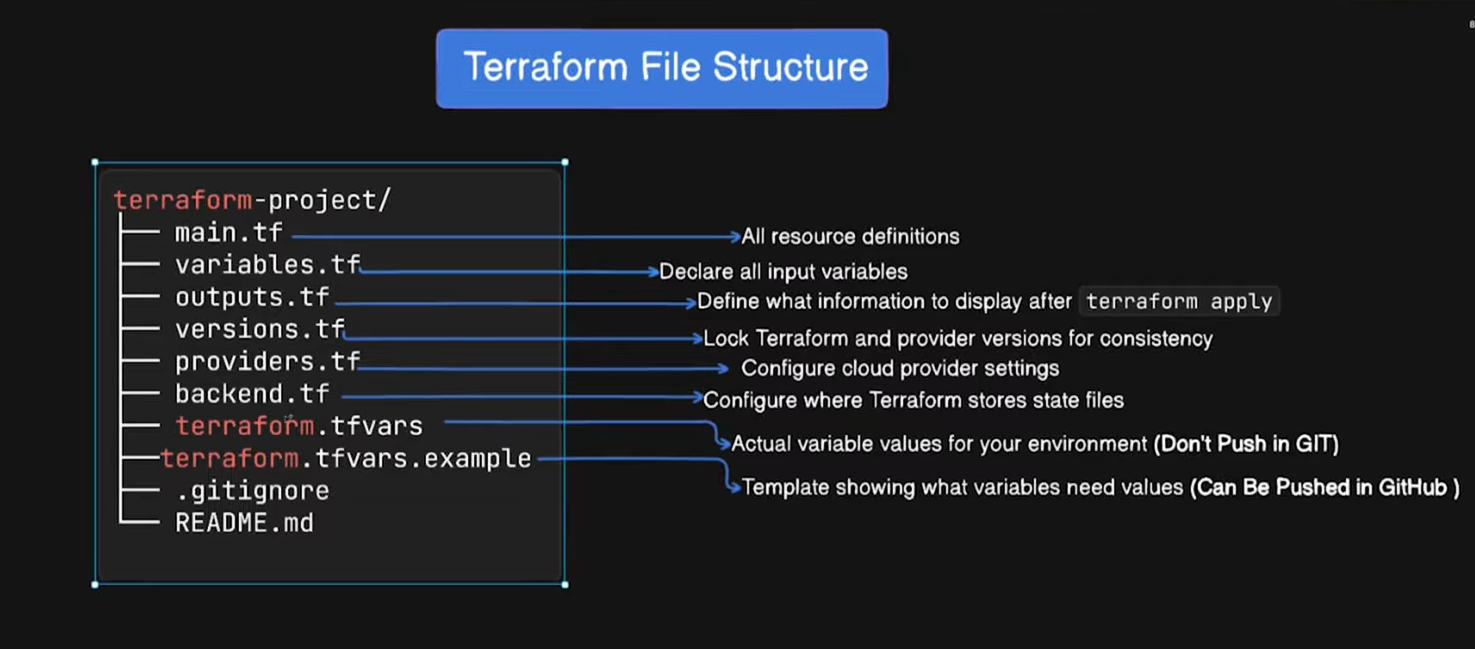
🌍 What Is a Terraform Project Structure?
Terraform project structure defines how you organize files, modules, environments, and state so that:
- Infra is scalable
- Teams can collaborate safely
- Changes don’t break production
- CI/CD can manage it cleanly
🧱 Core Principles (Interview Gold)
When explaining structure, always anchor to these:
- Separation of concerns
- Reusability via modules
- Environment isolation
- Remote state & locking
- Least privilege
- CI/CD friendly
🏗️ Recommended Production AWS Terraform Structure
✅ Standard & Scalable Layout
terraform-aws/
├── modules/
│   ├── vpc/
│   │   ├── main.tf
│   │   ├── variables.tf
│   │   └── outputs.tf
│   ├── ec2/
│   ├── rds/
│   └── alb/
│
├── envs/
│   ├── dev/
│   │   ├── main.tf
│   │   ├── terraform.tfvars
│   │   └── backend.tf
│   ├── staging/
│   └── prod/
│
├── provider.tf
├── versions.tf
└── README.md
🧩 Why This Structure Works
| Folder | Purpose |
|---|---|
modules/ | Reusable infra components |
envs/ | Environment-specific configuration |
backend.tf | Remote state per env |
terraform.tfvars | Env-specific values |
🔹 modules/ (MOST IMPORTANT)
Rule: One module = One responsibility
Example: modules/vpc
# modules/vpc/main.tf
resource "aws_vpc" "this" {
  cidr_block = var.cidr
}
# modules/vpc/variables.tf
variable "cidr" {
type = string
}# modules/vpc/outputs.tf
output "vpc_id" {
value = aws_vpc.this.id
}👉 Modules must never:
- Contain backend config
- Hardcode values
- Reference environments directly
🔹 envs/ (Environment Isolation)
Each environment has its own state file.
Example: envs/dev/main.tf
module "vpc" {
  source = "../../modules/vpc"
  cidr   = var.vpc_cidr
}
terraform.tfvars
vpc_cidr = "10.0.0.0/16"backend.tf
terraform {
  backend "s3" {
    bucket         = "my-tf-state-dev"
    key            = "vpc/terraform.tfstate"
    region         = "ap-south-1"
    dynamodb_table = "tf-lock"
  }
}
🔐 Remote State Best Practices (AWS)
Use:
- S3 → state storage
- DynamoDB → state locking
Why?
- Prevents concurrent
apply - Enables team collaboratio
- Disaster recovery
🧠 Interview Tip:
“Each environment has an isolated state backend to avoid cross-environment impact.”
🔄 versions.tf (Pin Everything)
terraform {
  required_version = ">= 1.5.0"

  required_providers {
    aws = {
      source  = "hashicorp/aws"
      version = "~> 5.0"
    }
  }
}
👉 Prevents breaking upgrades.
🔹 provider.tf
provider "aws" {
  region = var.region
}
Use variables for:
- Region
- Account (via profiles or assume role)
🔒 Security Best Practices
❌ NEVER:
- Commit
.tfstate - Commit secrets in
.tfvars
✅ ALWAYS:
*.tfstate
*.tfstate.backup
.terraform/
Use:
- AWS Secrets Manager
- SSM Parameter Store
- Vault
🔁 CI/CD Friendly Structure
Pipeline example:
cd envs/dev
terraform init
terraform plan
terraform apply
Prod:
- Manual approval
- Read-only plan
- Restricted IAM role
🧪 Small vs Large Team Structures
Small Team
terraform/
├── main.tf
├── variables.tf
└── outputs.tf
Enterprise (Recommended)
terraform/
├── modules/
├── envs/
├── policies/
└── pipelines/
🚫 Common Bad Practices (Say This in Interviews)
- One state file for all envs ❌
- Hardcoded AWS credentials ❌
- No module abstraction ❌
- No state locking ❌
- Applying from local laptops in prod ❌
🧾 Interview-Ready Summary (MEMORIZE)
“In AWS Terraform projects, we use a module-based structure with environment isolation. Each environment has its own backend and tfvars, remote state stored in S3 with DynamoDB locking, provider and version pinning, and CI/CD-controlled applies.”
🔥 This answer signals real production experience.