🧠 What are System Calls in Linux?
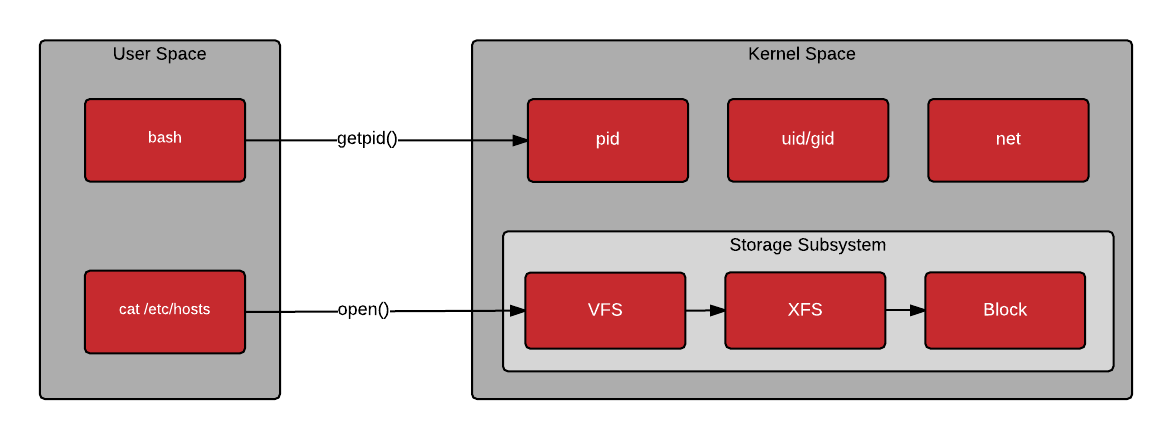
📊 Visual Understanding


⚡ Simple Definition
A system call is a way for a program (user space) to request services from the Linux kernel.
👉 Because:
-
Apps cannot directly access hardware
-
Only the kernel has full control
So apps say:
“Kernel, please do this for me”
🔁 Real-Life Analogy
Think of it like this:
-
👨💻 You (user/app)
-
🧑🍳 Waiter (system call interface)
-
👨🍳 Kitchen (kernel)
👉 You don’t go into the kitchen directly
👉 You place an order via waiter → kitchen executes
🔧 Why System Calls Exist
Without system calls:
-
Apps could directly access hardware ❌ (dangerous)
-
System would crash easily ❌
-
No security ❌
👉 System calls ensure:
-
✅ Security
-
✅ Stability
-
✅ Controlled access
🧱 How System Calls Work (Step-by-Step)
Example: cat file.txt
-
You run command →
cat -
catneeds to read file -
It makes a system call →
read() -
Kernel:
-
Checks permissions
-
Reads file from disk
- Kernel returns data → app prints it
🔥 Flow:
User App → System Call → Kernel → Hardware → Response → App
📂 Types of System Calls (Important for Interviews)
1. File Management
open(),read(),write(),close()
👉 Used when:
-
Reading logs
-
Writing files
2. Process Management
fork(),exec(),exit(),wait()
👉 Example:
- Running any command → new process created
3. Device Management
- Interacting with hardware (disk, printer, etc.)
4. Information Management
getpid(),getuid()
👉 Used to get system/process info
5. Communication (IPC)
- Pipes, shared memory, sockets
👉 Used in:
-
Microservices
-
Network apps
🧠 Important Concepts
🔹 User Mode vs Kernel Mode
| Mode | Description |
|---|---|
| User Mode | Apps run here (restricted) |
| Kernel Mode | Full access (danger zone) |
👉 System call = switch from user mode → kernel mode
🔹 Context Switching
-
CPU switches between user & kernel
-
Slight overhead (important in performance tuning)
🔥 DevOps-Level Examples
1. Reading Logs
cat /var/log/syslog👉 Internally:
open()→read()→close()
2. Running a Command
ls👉 Internally:
fork()→exec()
3. Network Call
curl google.com👉 Uses:
socket(),connect(),send(),recv()
🧪 How to SEE System Calls (VERY IMPORTANT)
Use:
strace ls👉 Output shows:
- All system calls used by
ls
Example:
open("/etc/ld.so.cache", O_RDONLY)
read(3, ...)
💡 This is how real debugging is done