Linux is designed in layers, where each layer has a specific responsibility.
🧱 1. Hardware Layer (Base)
This is your physical machine or VM:
- CPU
- RAM
- Disk (SSD/HDD)
- Network interface
👉 Linux doesn’t directly expose hardware to applications
👉 Everything goes through the kernel
⚙️ 2. Kernel (🔥 Most Important Layer)
The Linux Kernel is the core of the OS. 👉 It acts like a bridge between hardware and software
🔑 Main Responsibilities:
1. Process Management
- Creates, schedules, kills processes
- Handles multitasking
Example:
- When you run
kubectl, it becomes a process managed by kernel
2. Memory Management
- Allocates RAM
- Manages virtual memory
- Handles swapping
3. Device Drivers
- Communicates with hardware (disk, keyboard, NIC) 👉 Example:
- Your AWS EBS volume → handled via kernel driver
4. File System Management
- Handles read/write operations
- Manages file permissions
5. Networking Stack
- TCP/IP implementation
- Routing packets
👉 Example:
curl google.com→ kernel handles packet flow
🧠 Important Concept: Kernel Space vs User Space
| Feature | Kernel Space | User Space |
|---|---|---|
| Access | Full hardware access | Limited |
| Risk | Crash = system crash | Safe |
| Code | Kernel modules, drivers | Apps, shells |
👉 Separation = security + stability
🔄 3. System Call Interface
This is how user programs talk to kernel
👉 Apps cannot directly access hardware
👉 They use system calls
Examples:
open()→ open fileread()→ read filefork()→ create process
🔥 Real Flow:
App → System Call → Kernel → Hardware → Response back
👉 Example:
- You run
cat file.txtcat→ system call → kernel → disk → output
🧑💻 4. User Space (Where YOU Work)
This is where all applications run.
🐚 Shell
- Interface between user & kernel
- Examples: bash, zsh
👉 You type:
ls (list files)
👉 Shell converts → system call → kernel executes
📦 System Libraries
- Pre-written functions used by apps
- Example:
glibc
👉 Saves developers from writing low-level code
📱 Applications
- Everything you run:
- Docker
- Nginx
- Kubernetes tools
- CLI tools
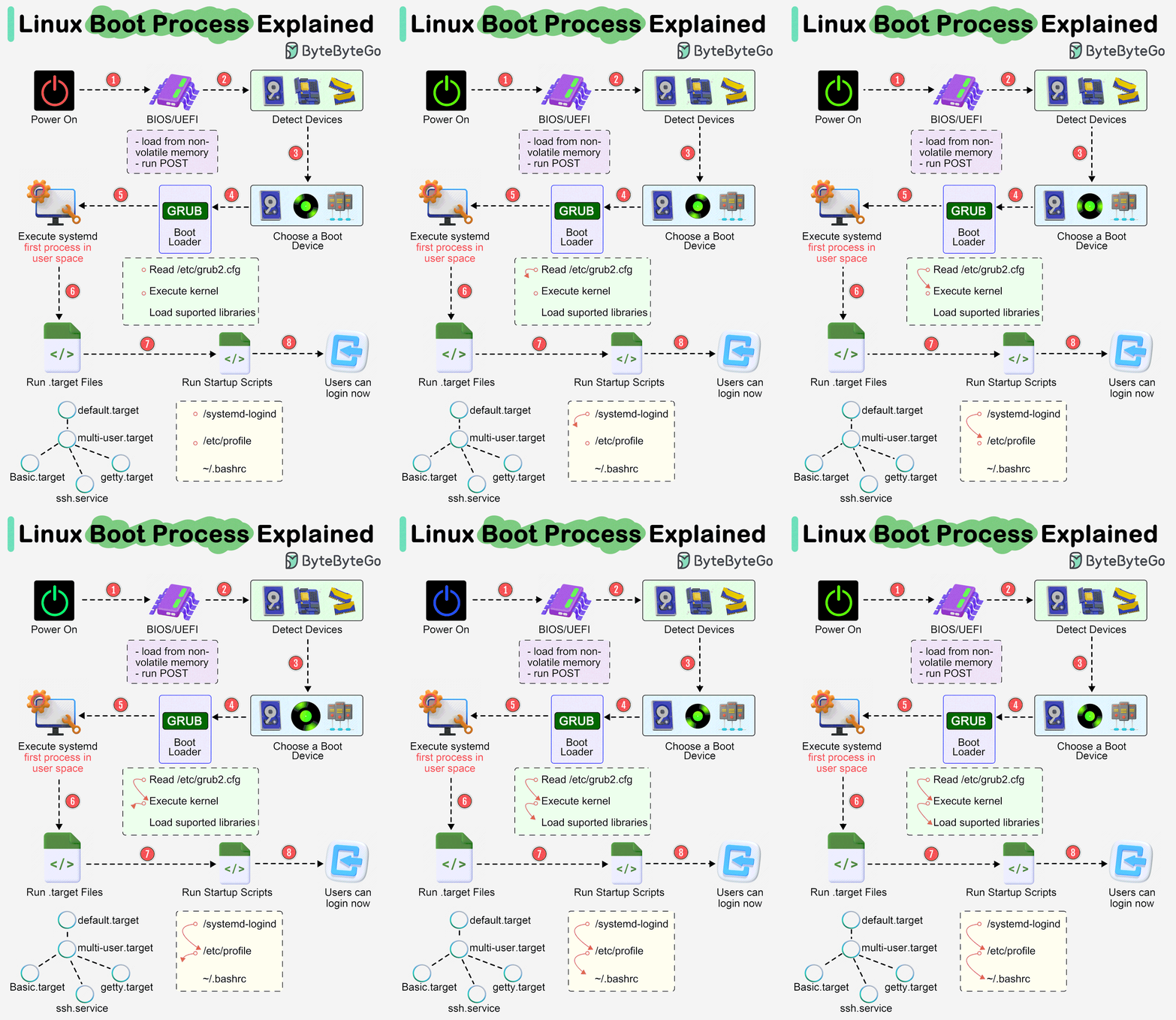
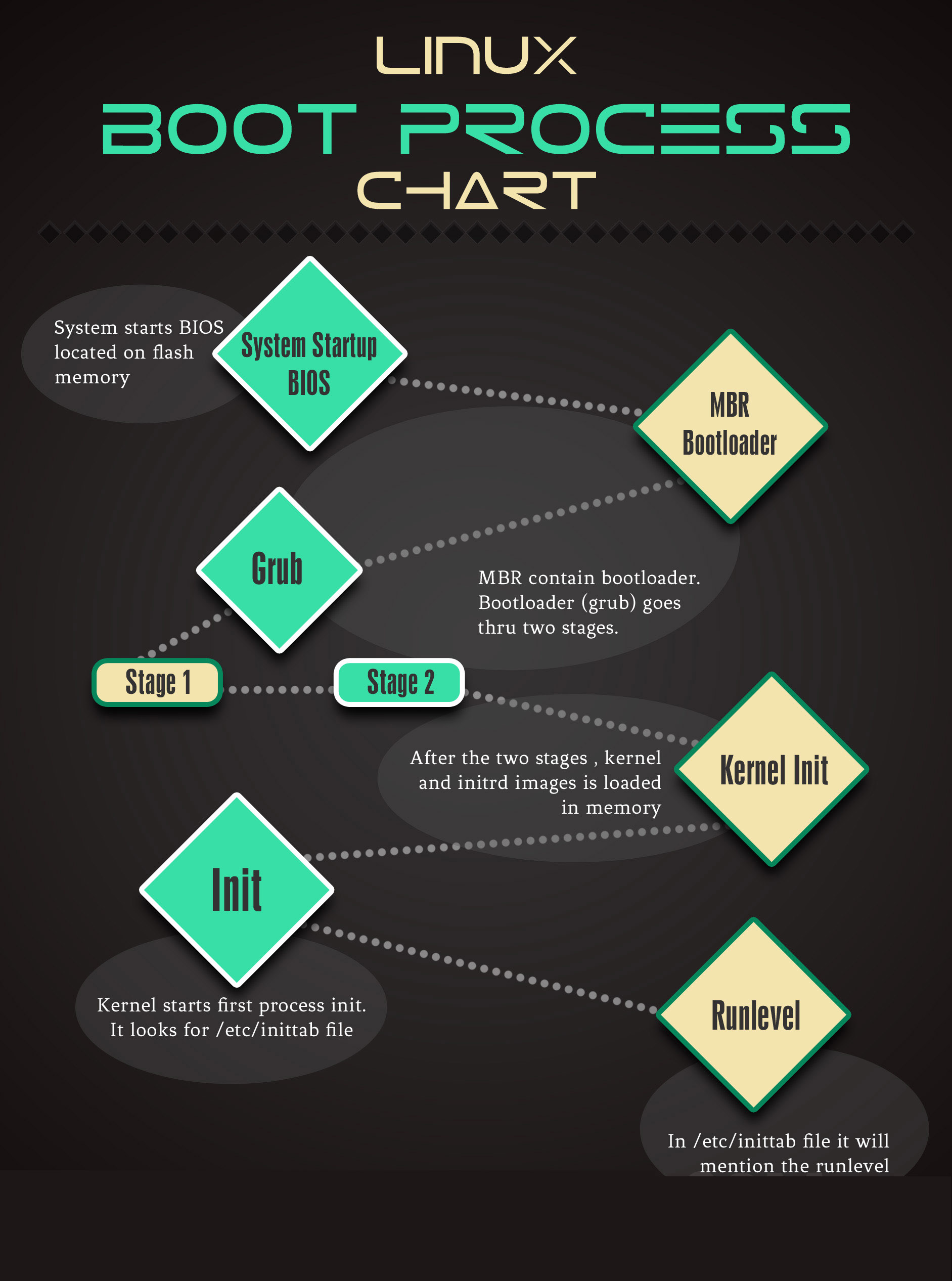
🔁 5. Boot Process (VERY IMPORTANT)
4
Step-by-step:
- BIOS/UEFI
- Initializes hardware
- Bootloader (GRUB)
- Loads kernel into memory
- Kernel
- Starts system
- Mounts root filesystem
- Init System (systemd)
- Starts services
- User Space
- Login prompt appears
👉 DevOps Use:
- If server not booting → issue in this chain
🔥 Real DevOps Example (Connect Everything)
Scenario: API not responding
What happens internally:
- User hits API → request reaches server
- Kernel networking stack receives packet
- Kernel passes to app (Node/Python server)
- App reads config file → system call
- Kernel reads from disk
- Response sent back via kernel
👉 If issue:
- Network issue → kernel
- App crash → user space
- Disk issue → filesystem layer
🧠 Advanced Concepts (Must Know for You)
🔹 Monolithic Kernel (Linux)
- Everything inside kernel (drivers, FS, networking)
👉 Fast but complex
🔹 Loadable Kernel Modules (LKM)
- Add/remove drivers without reboot
🔹 Namespaces & cgroups (Docker/K8s Core)
- Process isolation
- Resource limits
👉 This is how containers work internally
⚡ How This Helps YOU (Important)
After understanding this:
- You can debug:
- High CPU → process/kernel
- Disk issues → filesystem/kernel
- Network → kernel stack
- You stop guessing and start thinking in layers
🚀 Final Mental Model
Think like this:
User → Shell → System Call → Kernel → Hardware
🔥 Pro Tip (Very Important)
Whenever something breaks, ask:
👉 “Which layer is failing?”
- App issue? → User space
- Permission issue? → Kernel
- Network issue? → Kernel stack
- Boot issue? → Bootloader/kernel
If you want next:
- I can break down kernel internals (process scheduling, memory paging)
- Or give you real debugging scenarios asked in DevOps interviews
Just tell me 👍