AWS EC2 (Elastic Compute Cloud)
🔹 Definition:
EC2 is a virtual server in the AWS cloud. It provides resizable compute capacity to run applications.
Key Concepts
- AMI (Amazon Machine Image) → Template with OS + software, used to launch instances.
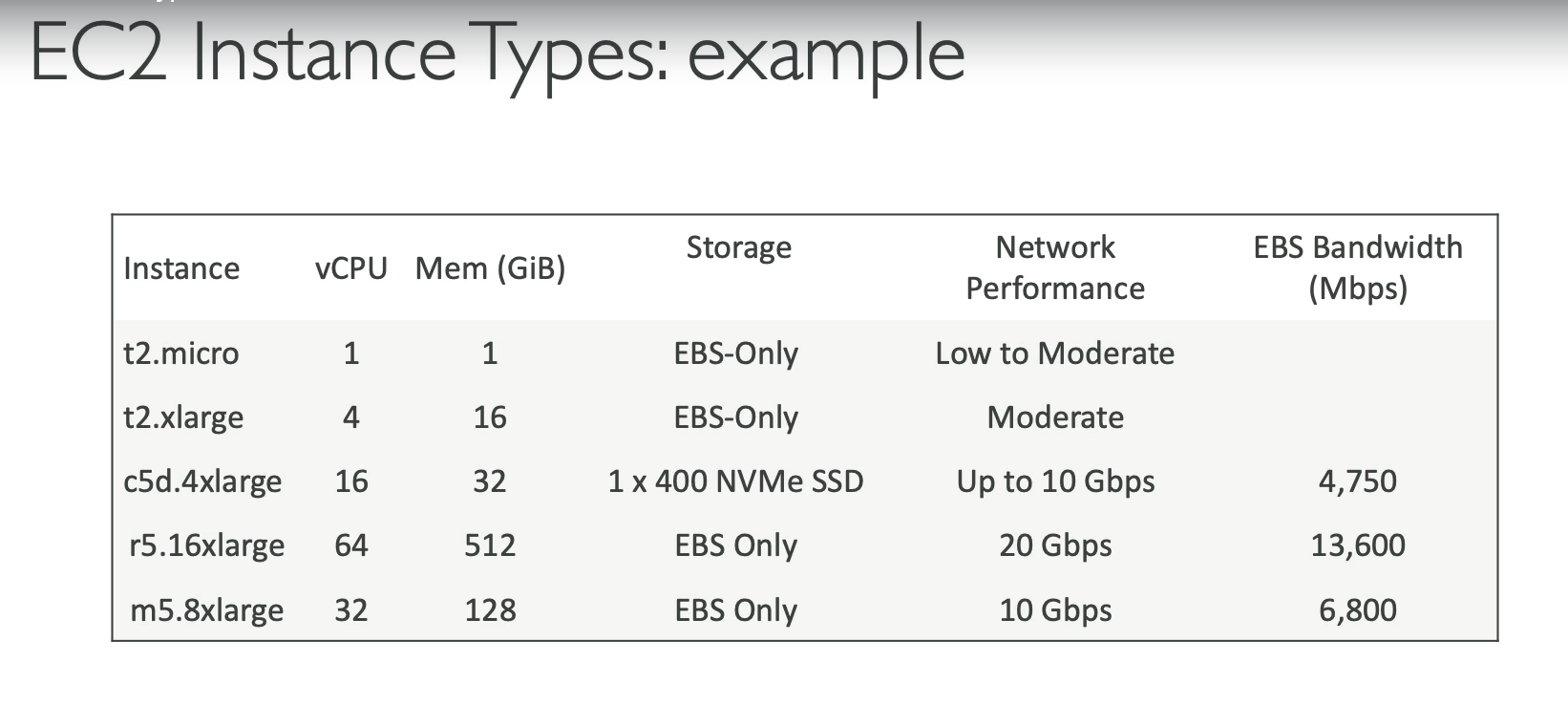
- Instance Types → Different combinations of CPU, memory, storage, networking. (e.g., t2.micro, m5.large)
- EBS (Elastic Block Store) → Persistent storage attached to EC2.
- Instance Store → Temporary storage, data lost on stop/terminate.
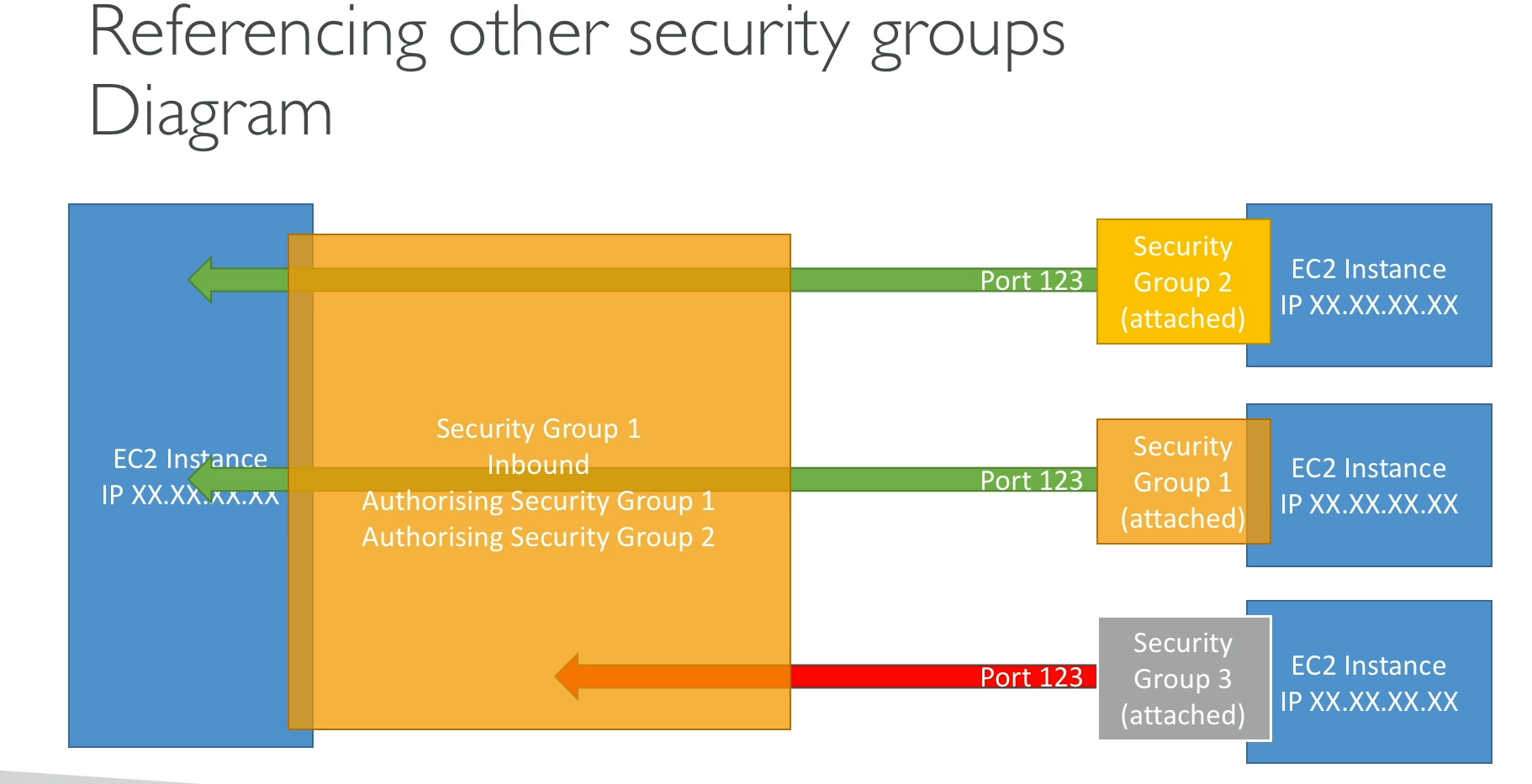
- Security Groups → Virtual firewall (instance-level).
- Key Pairs → SSH login (Linux) / RDP (Windows).
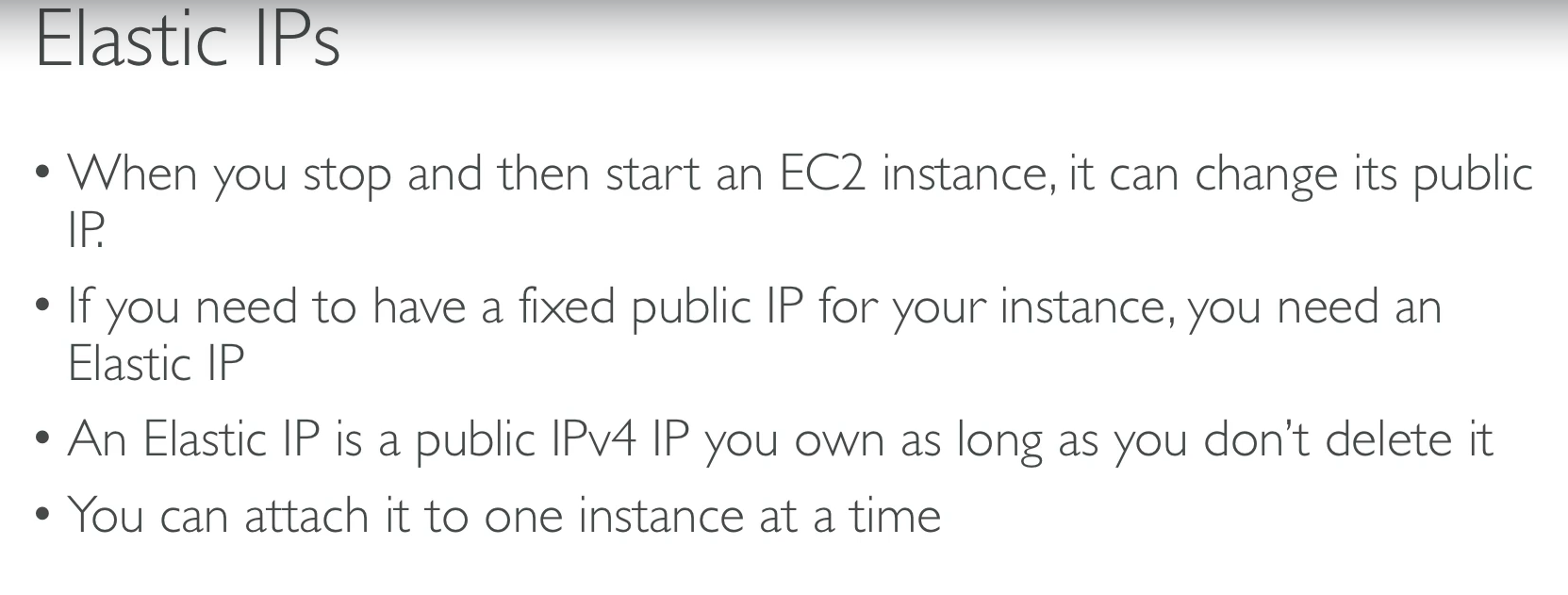
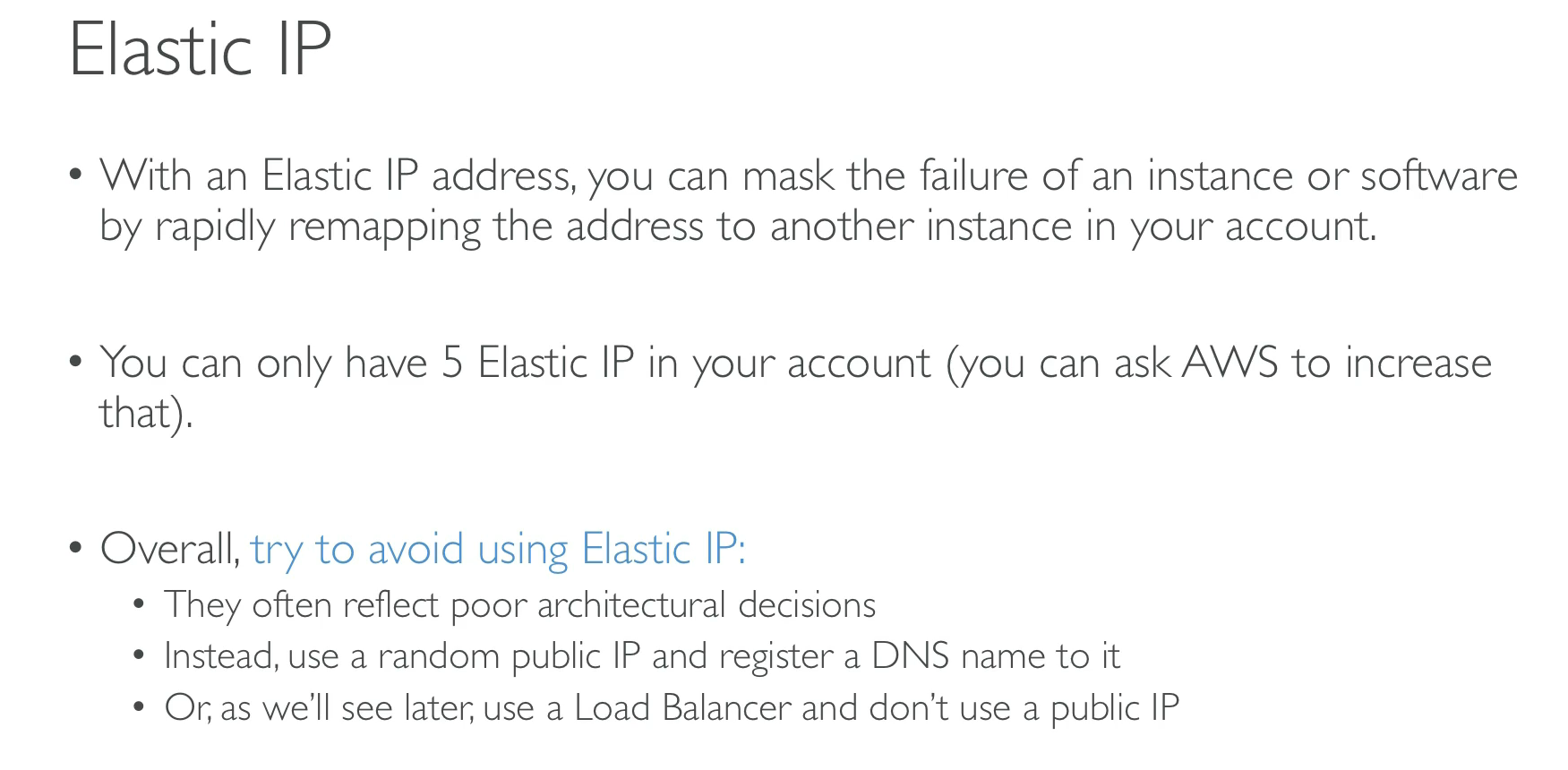
- Elastic IP → Static public IP for an instance.
- Placement Groups → How instances are placed on hardware (Clustered, Spread, Partition).
Lifecycle
- Launch → Choose AMI, instance type, VPC/subnet, storage, SG.
- Running → Instance active, can connect via SSH/RDP.
- Stop/Start → Preserves EBS but changes public IP (unless Elastic IP used).
- Terminate → Instance + EBS (if not kept) deleted.
Pricing Models
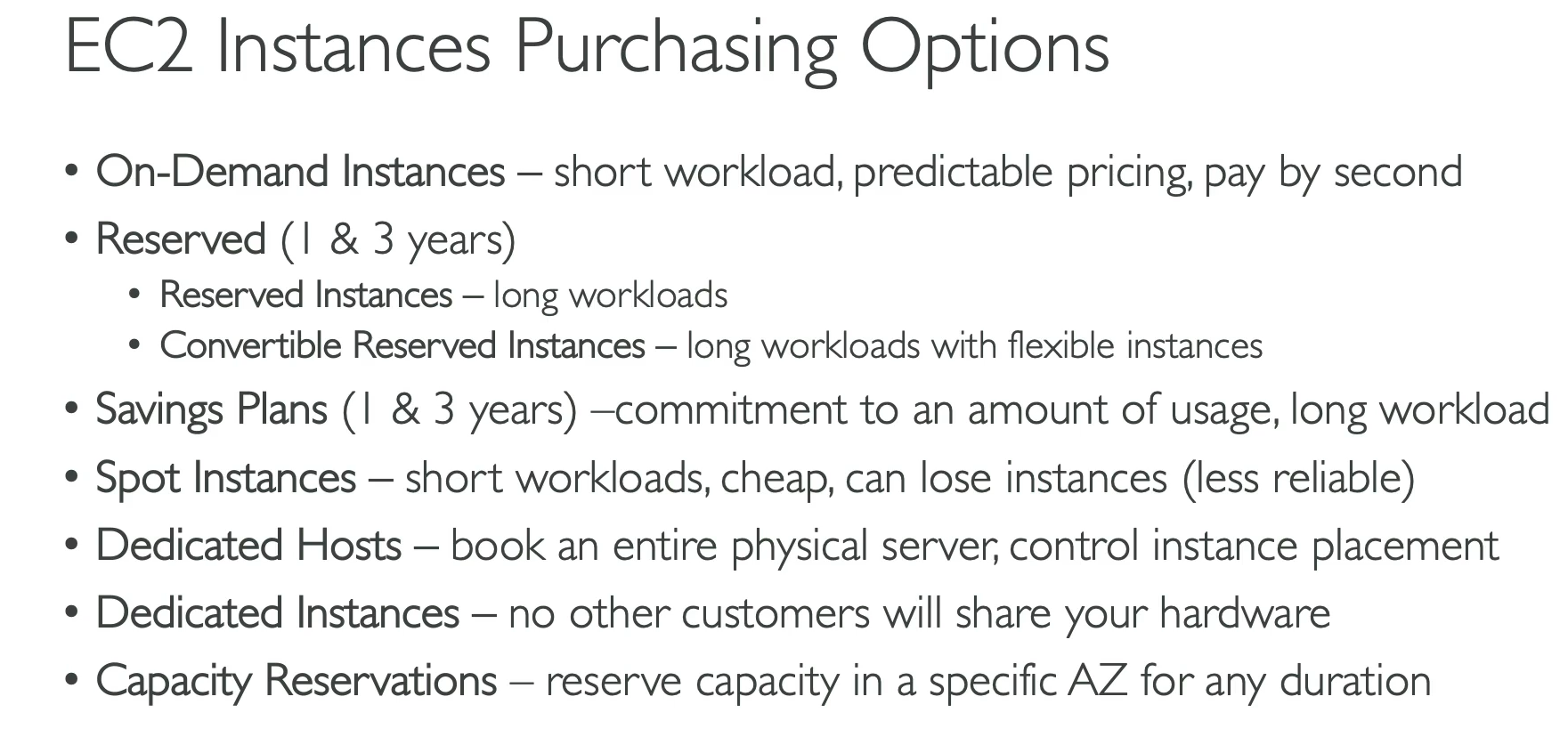
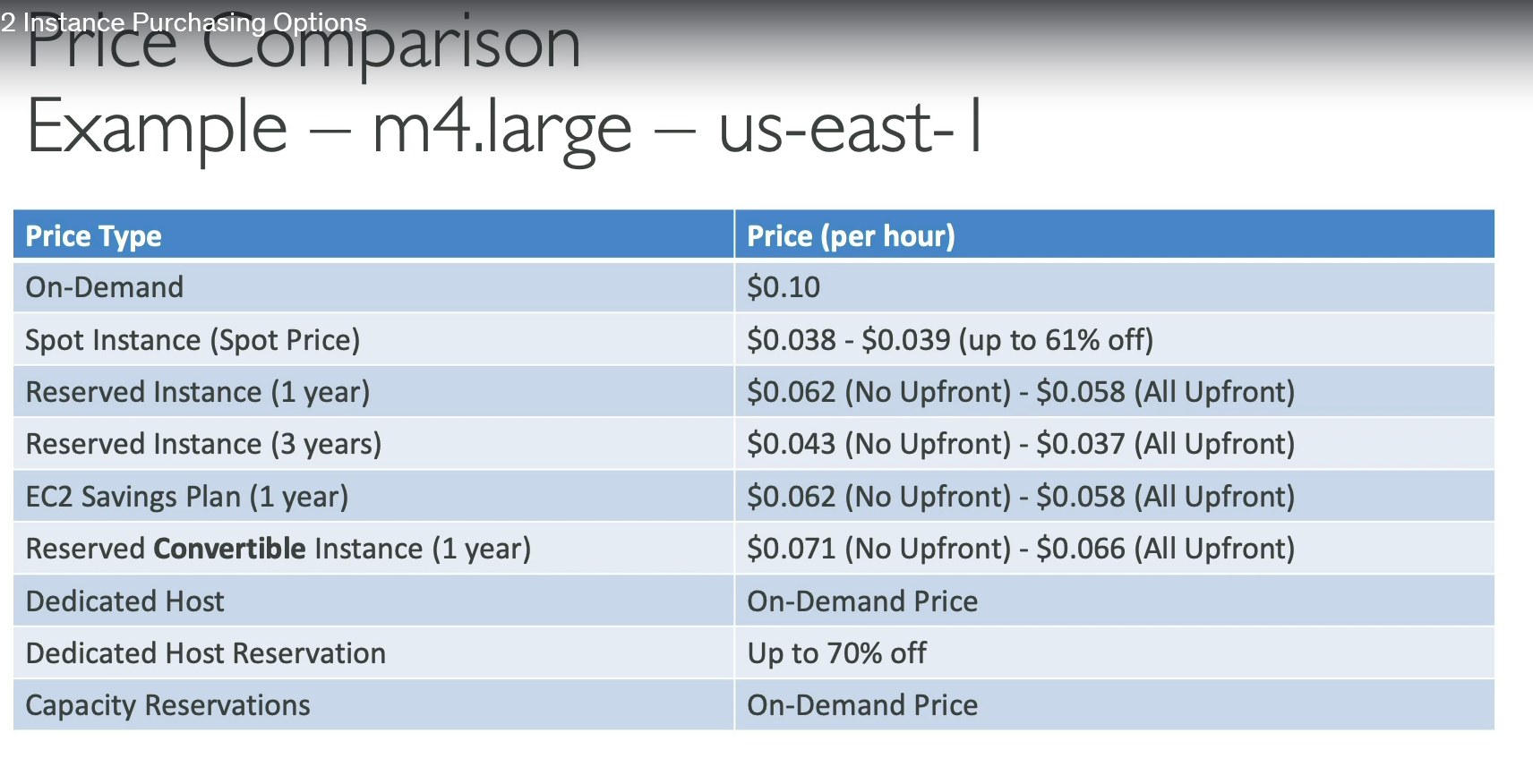
- On-Demand → Pay per second/hour, no commitment.
- Reserved → 1-3 year contract, cheaper (~75% less).
- Spot → Bid on unused capacity, very cheap, can be interrupted.
- Dedicated Hosts/Instances → Physical server dedicated to you.
Scaling
- Auto Scaling Group (ASG) → Automatically add/remove EC2s based on demand.
- Elastic Load Balancer (ELB) → Distributes traffic across multiple EC2s.
Use Cases
- Running web servers, backend apps.
- Hosting databases (non-managed).
- High-performance computing.
- Batch jobs.
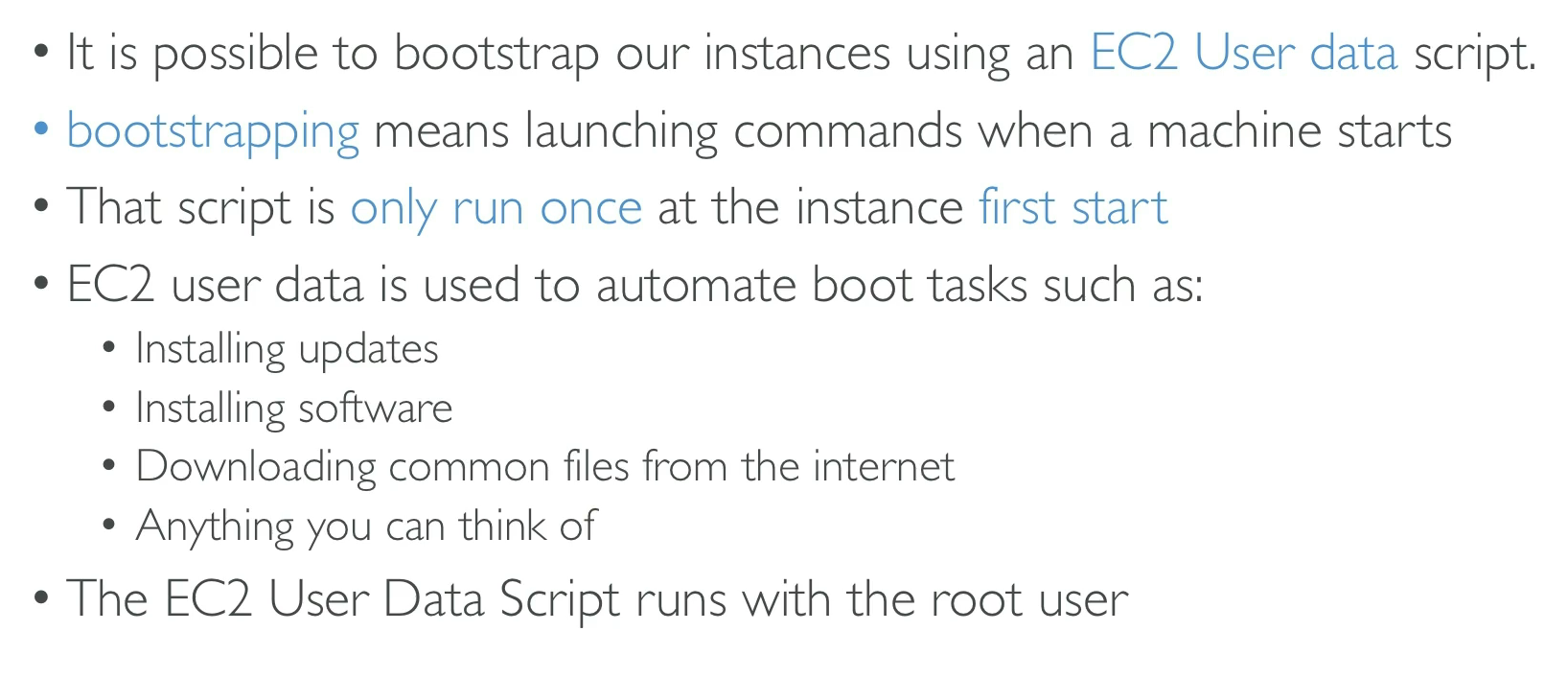
AWS Security Group (SG)
🔹 Definition:
A virtual firewall at the instance level (works on EC2, RDS, Lambda in VPC, etc.). It controls inbound (ingress) and outbound (egress) traffic.
Key Properties
- Stateful → If inbound is allowed, response is automatically allowed (no need to define outbound).
- Instance-level → Applied to EC2/network interfaces, not subnets.
- Default SG → Created with every VPC; allows all outbound but no inbound.
- Rules → Allow only (❌ no deny option). Deny is handled by NACLs.
Rules
- Inbound rules → Define what traffic is allowed into instance. (e.g., allow SSH from
0.0.0.0/0) - Outbound rules → Define what traffic can leave. (Default: allow all)
- Protocol/Port/IP → Rules specify protocol (TCP/UDP/ICMP), port (22, 80, 443), and source/destination (IP, CIDR, SG).
Limits
- Up to 5 SGs per ENI (Elastic Network Interface).
- Up to 60 inbound + 60 outbound rules per SG (soft limit, can be increased).
Difference vs NACL
| Security Group | Network ACL |
|---|---|
| Instance-level | Subnet-level |
| Stateful | Stateless |
| Only allow rules | Allow + Deny |
| Applied to ENI/EC2 | Applied to entire subnet |
SSH (Secure Shell)
🔹 Definition:
A secure protocol to remotely access and manage servers over an encrypted connection.
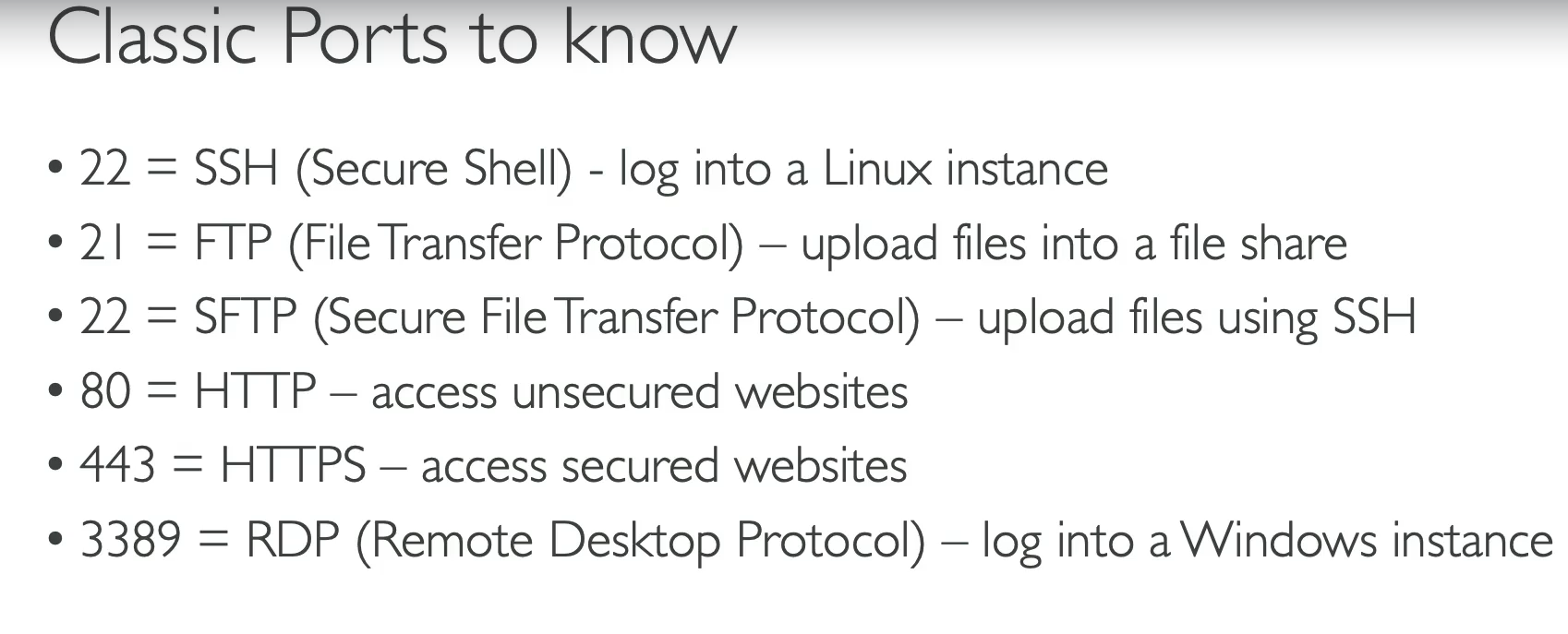
- Default port: 22
- Replaces insecure protocols like Telnet.
How SSH Works
- Client → Server connection.
- Authentication via:
- Username + Password, OR
- Key Pair (private key on client, public key on server).
- Encrypted communication channel established.
1. SSH in Linux/Mac
🔹 Native SSH client is built-in.
Steps:
-
Open terminal.
-
Run:
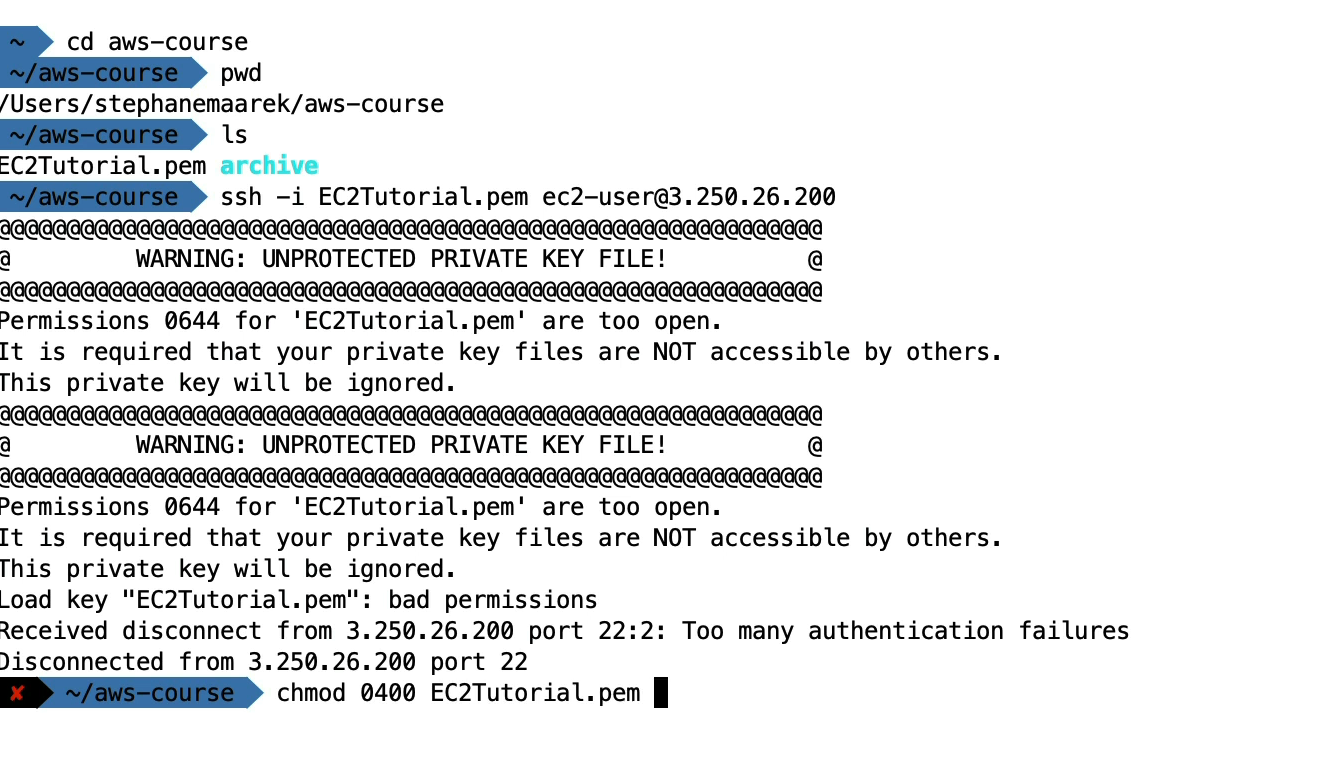
ssh -i /path/to/private-key.pem username@server-ip
  - `-i` → Identity file (private key).
  - `username` → Commonly `ec2-user`, `ubuntu`, or `root` (depends on AMI).
  - Example:
```bash
ssh -i mykey.pem ubuntu@54.201.123.45
2. SSH in Windows
🔹 Two ways:
A. Using PowerShell/Command Prompt (Windows 10+)
-
Place
.pemkey in safe folder. -
Run:
ssh -i C:\path\to\mykey.pem username@server-ipExample:
ssh -i C:\Users\Yash\Downloads\mykey.pem ec2-user@3.120.45.67
B. Using PuTTY (if older Windows)
PuTTY doesn’t support .pem directly → need .ppk.
- Use PuTTYgen to convert
.pem → .ppk. - Open PuTTY → Enter
username@server-ip. - In Connection > SSH > Auth, browse and select
.ppk. - Open → Login.
Common Issues
- Permission denied → Wrong username or key.
- Key file unprotected → Fix with:
chmod 400 mykey.pem- Port blocked → Ensure Security Group allows port 22 inbound.
Using AWS Console (EC2 Instance Connect)
- Works only for Amazon Linux 2 & Ubuntu.
- No need for SSH key.
- Console → EC2 → Select instance → Connect → EC2 Instance Connect → Connect.
- A browser-based SSH session opens.
use IAM rules for ec2 instances

Private vs public (IPv4)
| Feature | IPv4 | IPv6 |
|---|---|---|
| Address size | 32-bit | 128-bit |
| Address format | Decimal, dotted (e.g., 192.168.1.1) | Hexadecimal, colon-separated (e.g., 2001:0db8:85a3::8a2e:0370:7334) |
| Number of addresses | ~4.3 billion (2³²) | ~340 undecillion (2¹²⁸) |
| Header size | 20–60 bytes (variable) | 40 bytes (fixed) |
| Configuration | Manual or DHCP | Auto-configuration (SLAAC) + DHCPv6 |
| Security | Optional (IPSec not mandatory) | Built-in IPSec support |
| QoS (Quality of Service) | Uses Type of Service (ToS) | Uses Flow Label field (better QoS) |
| Broadcast | Supported | Not supported (uses multicast/anycast instead) |
| Fragmentation | Done by sender & routers | Done only by sender |
| NAT (Network Address Translation) | Widely used due to address shortage | Not required (huge address space) |
| Deployment | Older, still dominant | Newer, growing adoption |
AWS Placement Groups
🔹 A logical grouping of EC2 instances within an AWS region to influence how they are placed on underlying hardware.
- Goal → Improve performance, fault tolerance, or scalability depending on the strategy.
Types of Placement Groups
| Type | How it Works | Use Case |
|---|---|---|
| Cluster | Instances placed close together (same rack / low latency, high bandwidth). | High-performance computing (HPC), Big Data, ML training, tightly-coupled apps. |
| Spread | Instances placed across different racks/hardware → each instance on separate hardware. | Critical workloads needing high availability (small number of instances). |
| Partition | Instances divided into partitions, each partition on separate racks → failures isolated. | Large distributed systems (Hadoop, Cassandra, Kafka). |
- Placement group scope = single AZ (except Spread can span multiple AZs).
- Once launched, instance type must support the placement group (some don’t).
- Must launch all instances at the same time in a cluster placement group for best results.
- Moving existing instances into/out of placement groups isn’t straightforward (stop + relaunch needed).
Best Practices
-
Use Cluster → for low latency, high throughput (10 Gbps+ networking).
-
Use Spread → when you need fault isolation for up to 7 instances per AZ.
-
Use Partition → when running large, fault-tolerant distributed workloads.
Elastic Network Interface (ENI)
🔹 A virtual network card attached to an EC2 instance within a VPC.
- Provides networking features like IP addresses, MAC, security groups, etc.
- Think of it as the identity of an EC2 in a network.
Key Properties of ENI
- Primary Private IPv4 address (must have at least one).
- Secondary IPv4 addresses (optional, multiple allowed).
- One Elastic IP (EIP) per private IPv4.
- IPv6 addresses (optional).
- MAC address (auto-assigned).
- One or more Security Groups attached.
- Source/Dest Check → Enabled by default (disables when using as NAT/Firewall).
Attachment Types
- Primary ENI → Created by default with every EC2. Cannot be detached.
- Secondary ENI → Manually attached. Can detach and move between instances in the same AZ.
Use Cases
- High availability → Move ENI from a failed instance to a standby instance.
- Dual-homed instances → Instances with multiple ENIs in different subnets/security groups.
- Network appliances → Firewalls, NAT, intrusion detection systems.
- Management network → Separate ENIs for admin vs public traffic.
Limitations
- ENIs are bound to one AZ (cannot span AZs).
- Max ENIs per instance depends on instance type (e.g., t2.micro → 2 ENIs, m5.24xlarge → 15 ENIs).
EC2 Hibernate
🔹 A feature that lets you pause and resume your EC2 instance, keeping the in-memory (RAM) state intact.
- Similar to putting your laptop on hibernate mode.
- When restarted, the applications continue from where they left off.
How It Works
- When you hibernate:
- Contents of RAM are written to the root EBS volume.
- Instance stops, EBS and ENIs remain attached.
- Data in RAM + private IP preserved.
- When you start again:
- OS loads RAM contents back from EBS.
- Applications resume instantly from saved state.
Supported Instance Types
- Instance families: C3, C4, C5, M3, M4, M5, R3, R4, R5, T2, T3 (selected types).
- Only On-Demand and Reserved Instances. (❌ Not Spot).
Requirements
- Root volume must be EBS (encrypted, large enough for RAM dump).
- Instance must use HVM AMI (Amazon Linux 2, Ubuntu, Windows).
- Memory (RAM) limit: up to 150 GB.
- Hibernate enabled at launch (cannot enable later).
Benefits
- Faster startup (resume apps immediately).
- Keeps in-progress work safe (RAM state saved).
- Good for long-running processes where reloading is costly.
Limitations
- ❌ Not available for Spot instances.
- ❌ Only for EBS-backed instances (no instance store).
- ❌ Hibernate time limited to 60 days.
- ❌ Limited instance families.
Use Cases
- Development/test environments → Pause/resume quickly.
- Apps needing long initialization (ML models, in-memory databases).
- Workloads paused overnight/weekends to save costs.